API Keys Done Right: Scoped Permissions for Third-Party Integrations
A technical guide to building and managing API keys with granular, scoped permissions -- so a compromised integration cannot take down your entire account.
On this page · 7
The Problem with All-or-Nothing API Keys
Most developers have experienced the moment of anxiety: you are setting up a third-party integration and the service asks you to generate an API key. You click “Create Key,” and you receive a single token that has full access to everything in your account. Campaigns, contacts, billing, settings — all accessible to whatever system you hand that key to.
This is the all-or-nothing model, and it is a security problem hiding in plain sight. When every key can do everything, a single leaked key means total exposure. A compromised CI/CD pipeline does not just lose the ability to read campaign analytics — it gains the ability to send campaigns, delete contacts, and modify account settings. The blast radius of a security incident is the entire account.
The principle of least privilege — the idea that any credential should have only the permissions it needs and nothing more — is one of the oldest ideas in computer security. Yet most SaaS platforms still hand out keys with full access, leaving their customers to manage the risk themselves.
Why scoped permissions matter
Scoped API keys solve this by letting you define exactly what each key can do. Instead of a single master key, you create purpose-specific keys: one for your CRM integration that can only read and write contacts, one for your analytics dashboard that can only read campaign data, one for your transactional email service that can only send emails through the Connect API.
If any one of these keys is compromised, the damage is contained to the scope of that key. A leaked analytics key cannot send campaigns. A leaked contact sync key cannot access templates. The blast radius shrinks from “everything” to “just what that integration needed.”
Anatomy of a Scoped API Key System
A well-designed scoped key system has three components: the key itself (for authentication), the scopes (for authorisation), and the management lifecycle (creation, rotation, revocation). Each component needs to be implemented correctly — a beautifully scoped key that is stored in plaintext is still a security risk.
The key format
An API key needs to be long enough to prevent brute-force guessing, random enough to prevent prediction, and structured enough to support efficient verification. A common pattern — and the one Brixus365 uses — is a prefixed key format: a short identifier followed by a cryptographically random string.
The bx_ prefix serves a practical purpose: it makes keys identifiable in logs, environment variables, and secret scanners. If a security tool finds a string starting with bx_ in a code repository, it can immediately flag it as a Brixus365 API key — even without understanding the full key format.
The scope model
Scopes define what a key is allowed to do. They are typically structured as resource:action pairs — for example, marketing:read or contacts:write. This two-part structure makes it easy to understand at a glance what a scope grants, and easy to add new resources or actions as the platform grows.
The Scope Matrix
Four resource categories, each with granular read and write permissions
Templates
Email templates and content
Read
View and list templates
Write
Create, edit, delete, duplicate templates
Marketing
Campaigns, recipients, groups, analytics
Read
View campaigns, messages, recipients, groups, analytics
Write
Create, send, pause, resume campaigns; manage recipients and groups
Contacts
Contact management and imports
Read
List and view contacts
Write
Create, update, delete, import, export contacts
Emails
Developer Email API — send and read your application emails
Read
View sends, analytics, and starter templates
Send
Send emails via POST /v1/emails (includes read)
Write implies read: A key with marketing:write automatically has marketing:read permissions. You never need to specify both.
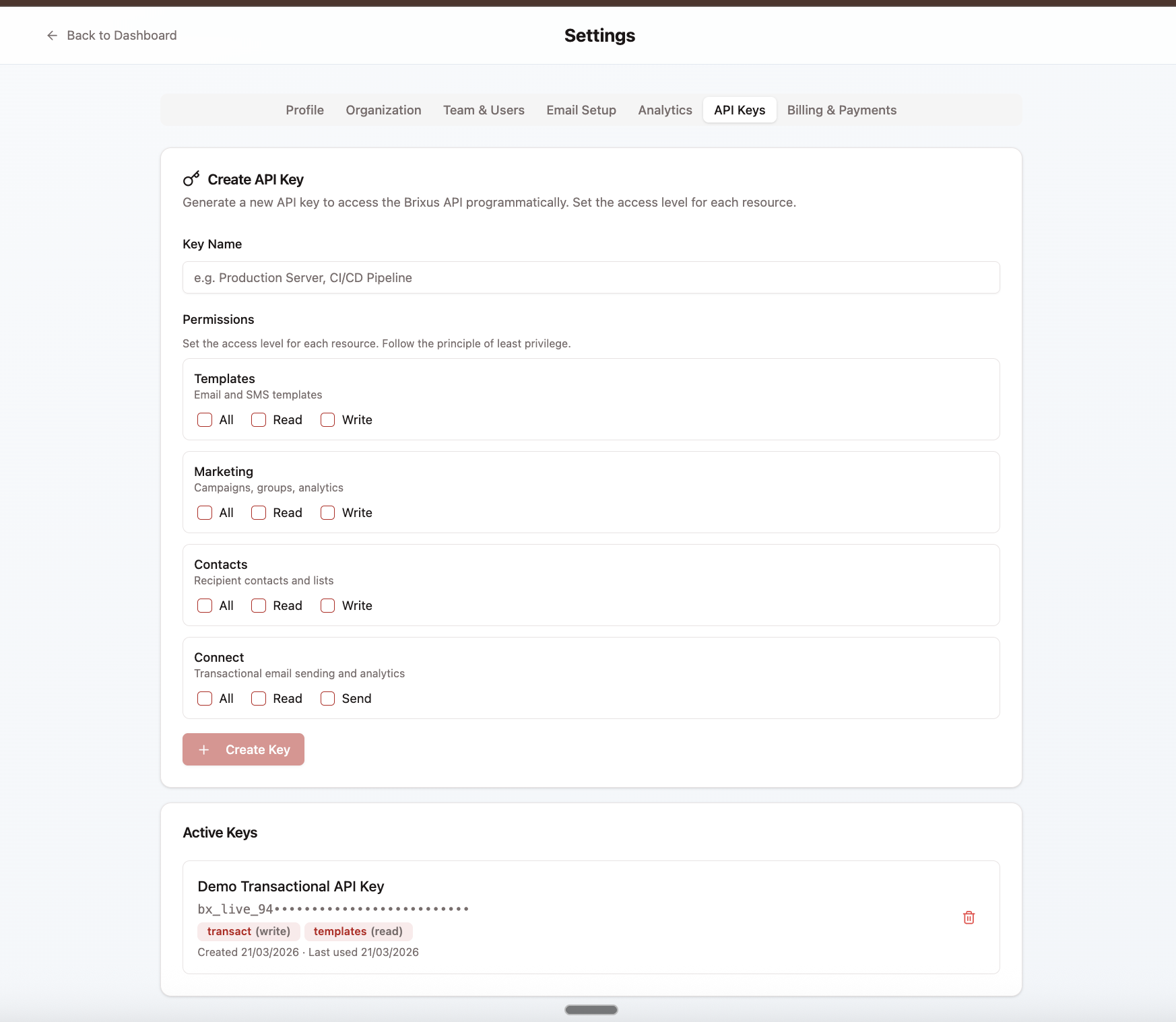
A key feature of a good scope system is that write implies read. If you grant marketing:write, the key automatically has marketing:read permissions too. This avoids the common annoyance of needing to specify both read and write for every resource, while still allowing read-only keys for integrations that only need to observe.
Verification: from key to permission
When an API request arrives with a key, the system needs to verify two things: is this key valid (authentication), and does this key have permission to perform this action (authorisation). The verification flow looks like this:
- Extract a short prefix from the key for fast database lookup
- Find candidate keys in the database that match the prefix
- Compute a cryptographic hash of the provided key and compare it to the stored hash
- If the hash matches, check whether the key’s scopes include the permission required by the endpoint
- If everything checks out, execute the request
This entire process takes microseconds. The prefix lookup narrows the database search to one or two candidates, and the hash comparison is a constant-time operation that prevents timing attacks.
Security Architecture: Protecting the Keys That Protect Your Data
An API key is a bearer credential — anyone who has it can use it. This makes the security of the keys themselves critical. A scoped key system is only as strong as the measures protecting the keys from exposure and misuse.
Five Layers of API Key Security
How a well-designed key system protects your data at every stage
Cryptographically random generation
32 bytes of randomness from a secure source. No sequential IDs, no guessable patterns, no timestamps embedded in the key.
One-time reveal
The full key is shown exactly once at creation. After that, only a masked prefix is visible. If you lose it, you revoke and create a new one.
Hashed storage
Only a cryptographic hash of the key is stored in the database. Even if the database is compromised, the actual keys cannot be recovered.
Prefix-based lookup
A short prefix enables fast database lookups without exposing the full key. Think of it like a credit card number — you see the last four digits, the system uses them to find the right record.
Instant revocation
Revoking a key takes effect immediately. No propagation delay, no cache invalidation window. The next API call using that key will fail.
Defence in depth
No single layer is the whole story. Together, they ensure that even a partial compromise — a leaked prefix, a stolen database backup — does not give an attacker a usable key.
Why not use passwords for API keys?
Password hashing algorithms like Argon2 and bcrypt are designed for a specific threat model: low-entropy secrets (passwords) that might be brute-forced. They are intentionally slow — each hash computation takes 10-100 milliseconds — to make brute-force attacks impractical.
API keys are a fundamentally different beast. A 32-character random key from a 62-character alphabet has approximately 190 bits of entropy — making brute-force infeasible regardless of hash speed. Using a fast keyed hash (HMAC-SHA256) instead of a slow password hash means verification happens in microseconds rather than milliseconds, which matters when you are authenticating every API request in a hot path.
The one-time reveal pattern
When you create a key, the system shows you the full key exactly once. After that point, the full key exists only wherever you stored it — the system only retains the hash. If you lose the key, there is no “show key again” button. You revoke the old key and create a new one.
This pattern exists because every additional place the key is stored or transmitted is an additional opportunity for exposure. If the system retained the full key so it could show it to you again, it would need to store it in a reversible format — and a reversible format means a compromised database yields usable keys. The one-time reveal is not an inconvenience; it is a deliberate security choice.
Real-World Use Cases: Scopes in Practice
The value of scoped keys becomes clear when you look at how different integrations interact with a marketing platform. Each integration has different requirements, and each should have credentials that match exactly those requirements — no more, no less.
Real-World Scope Configurations
Four common integration patterns and the exact scopes they need
CI/CD pipeline
A deployment pipeline that programmatically creates and sends campaigns after content approval.
Scopes granted
Why these scopes
Needs to create campaigns and trigger sends, but only reads existing templates — never creates them.
CRM integration
An external CRM syncs contacts bidirectionally with your Brixus365 workspace.
Scopes granted
Why these scopes
Write scope includes read. The CRM needs to create, update, and read contacts — nothing else.
Transactional email service
Your application sends order confirmations, password resets, and shipping updates via the Developer Email API.
Scopes granted
Why these scopes
Only needs to send application emails via POST /v1/emails. No access to marketing campaigns, contacts, or templates.
Analytics dashboard
A BI tool pulls campaign performance and transactional-send data for executive reporting.
Scopes granted
Why these scopes
Read-only access across marketing campaigns and the contact list. Cannot modify anything — only observe. Pair with emails:read if the dashboard also reports on Developer Email API sends.
The principle is always the same: grant the minimum scopes required for the integration to function. A key that can only read marketing analytics cannot accidentally send a campaign or delete a contact.
The pattern across all four scenarios is the same: define what the integration needs to do, grant exactly those scopes, and nothing else. If you find yourself adding scopes “just in case,” you are defeating the purpose of the system.
When to create a new key vs. expand an existing one
A common question is whether to create one key per integration or one key per team. The answer is almost always one key per integration. Sharing keys across integrations makes it impossible to revoke access to one system without breaking another. It also makes audit trails meaningless — if three systems use the same key, you cannot tell which system made a particular API call.
Key Lifecycle Management: Creation, Rotation, and Revocation
Creating a key is the easy part. The harder — and more important — part is managing keys over their lifetime. Keys that are created and forgotten become security liabilities. Keys that are never rotated accumulate risk over time. Keys that belong to former team members or deprecated integrations are open doors that nobody is watching.
API Key Lifecycle
From creation through daily use, rotation, and eventual revocation
Create
Name your key
Choose a descriptive name that identifies the integration
Select scopes
Pick only the permissions this integration needs
Copy the key
Store it securely — it will never be shown again
Use
Authenticate requests
Include the key in the Authorization header of every API call
Scope enforcement
Each endpoint checks the key's scopes before executing
Activity tracking
Every use updates the key's "last used" timestamp
Rotate
Create a replacement key
Generate a new key with the same scopes
Update integrations
Deploy the new key to all systems that use it
Revoke the old key
Once the new key is confirmed working, revoke the old one
Revoke
Immediate effect
Revocation is instant — the next API call using this key will fail
No undo
Revocation is permanent. If you need access again, create a new key
Audit trail preserved
The key's history and usage data remain for compliance
Most security frameworks recommend rotating API keys every 90 days. Brixus365 tracks “last used” timestamps so you can identify stale keys that may no longer be needed.
Key rotation: why 90 days?
The standard recommendation for key rotation is every 90 days. This is not an arbitrary number — it is based on the observation that the longer a key exists, the more opportunities there are for it to be exposed. Rotation limits the window of exposure: if a key was leaked 60 days ago but you rotate every 90 days, the leaked key becomes useless within a month.
Rotation should be a zero-downtime operation. The process is: create a new key with the same scopes, deploy it to the integration, verify it works, then revoke the old key. Both keys are valid simultaneously during the transition, so there is no window where the integration loses access.
Incident response: what to do when a key is compromised
If you suspect a key has been exposed — it appeared in a public repository, it was sent in an unencrypted channel, a team member with access left the company — revoke it immediately. Do not wait to confirm whether it was actually used maliciously. The cost of revoking and recreating a key is minutes of work. The cost of leaving a compromised key active is unbounded.
Best Practices for API Key Hygiene
Managing API keys well is a discipline, not a one-time setup. The following practices, applied consistently, will keep your integrations secure and your team confident that access is properly controlled.
- One key per integration — Never share keys across different systems. Each integration gets its own key with its own scopes. This gives you granular control over revocation and auditing.
- Minimum viable scopes — Grant only the permissions each integration needs to function. A read-only analytics tool does not need write access. A contact sync does not need campaign access.
- Store keys in secrets managers — Use your platform’s secrets manager (AWS Secrets Manager, HashiCorp Vault, Doppler) instead of hardcoding keys in source code or configuration files.
- Rotate every 90 days — Set a calendar reminder or automate rotation. Create the new key, deploy it, verify it works, then revoke the old one. Zero-downtime rotation.
- Audit stale keys quarterly — Review the “last used” timestamps of all active keys. Any key that has not been used in 90 days is either unnecessary or belongs to a broken integration. Investigate and revoke if appropriate.
- Revoke immediately on team changes — When a team member with key access leaves the company, revoke every key they created or had access to. Do not wait for the next rotation cycle.
- Never log full keys — Configure your application logging to redact API keys. Log only the prefix (e.g., bx_X7kLm…) for debugging purposes. Full keys in logs are a breach waiting to happen.
Frequently Asked Questions
What happens if I lose my API key?
Can I change the scopes on an existing key?
How many API keys should I create?
Are API keys better than OAuth tokens?
What scopes should I give my CI/CD pipeline?
How does Brixus365 handle key verification performance?
Should I use API keys for my mobile app?
Build with scoped API keys, not god mode
Per-scope read/write/delete permissions. One-time reveal, 90-day rotation reminders, full audit trail.