Sending Transactional Email with Brixus365: REST API, SMTP, and Everything In Between
A complete guide to sending transactional emails -- order confirmations, password resets, shipping notifications -- via REST API or SMTP. Includes migration paths from SendGrid and Mailgun, attachment handling, and template integration.
On this page · 8
What Are Transactional Emails?
Transactional emails are the messages your application sends in direct response to a user action or system event. An order confirmation after a purchase. A password reset link. A shipping notification. An invoice receipt. A welcome email after sign-up. Unlike marketing emails, which are sent to a list of subscribers, transactional emails are triggered by something the recipient did — they are expected, immediate, and often critical.
This distinction matters for two reasons. First, transactional emails do not require an unsubscribe link — they are not promotional, so anti-spam regulations treat them differently. Second, they have dramatically higher engagement rates than marketing emails. Open rates of 60-80% are common because the recipient is actively waiting for the message. A password reset email that does not arrive is not a missed marketing opportunity — it is a broken product experience.
Common transactional email types
- Order confirmations — Purchase details, order number, expected delivery
- Password resets — Secure, time-limited reset links
- Shipping notifications — Tracking numbers, estimated delivery dates
- Invoice receipts — Payment confirmations, PDF attachments
- Welcome emails — Account activation, onboarding next steps
- Two-factor authentication — Verification codes, login alerts
- Appointment reminders — Calendar invites, rescheduling links
Two Ways to Send
Brixus365 supports two methods for sending transactional email: a REST API and an SMTP endpoint. Both methods use the same delivery infrastructure, the same tracking system, and the same analytics dashboard. The choice between them depends on your technical setup, not on the features you need.
Two Ways to Send Transactional Email
Both methods get the same tracking, analytics, and delivery infrastructure
REST API
For developers who control the code
Send raw HTML content directly. Full control over the email body.
Reference a template ID and pass variables. The platform renders the final email.
SMTP
For platforms that only support SMTP config
Point your app or platform to smtp.brixus365.com. Uses your API key as the password.
Works with Shopify, WordPress, and any platform that accepts SMTP credentials.
Choose REST API when you control the application code. Choose SMTP when your platform (Shopify, WordPress, etc.) only accepts SMTP credentials. You can use both simultaneously.
REST API is the right choice when you control the application code. You make an HTTP request with the email content, and Brixus365 handles the rest. The API supports two modes: relay (you provide the raw HTML) and template (you reference a template ID and pass variables). The API gives you the most flexibility and the tightest integration.
SMTP is the right choice when your platform or application only supports SMTP configuration — Shopify, WordPress, WooCommerce, and dozens of other tools fall into this category. You point the platform to smtp.brixus365.com, enter your credentials, and every email sent by that platform flows through Brixus365 with full tracking and analytics. No code changes required.
Sending via REST API
The transactional email API is a single endpoint that accepts a JSON payload and queues the email for delivery. Authentication is via an API key in the Authorization header. The API returns a messageId that you can use to track the email through its lifecycle.
Relay mode vs template mode
Relay mode gives you full control. You provide the complete HTML body, subject line, and recipient details. This is ideal when your application generates the email content dynamically — for example, a receipt with line items calculated at runtime.
Template mode separates content from code. You reference a template by ID and pass a dictionary of variables. The platform renders the final email by merging the template with your variables. This is ideal when non-technical team members need to update email content without deploying code — change the template in the visual editor, and the next API call picks up the changes automatically.
REST API Request Examples
Relay mode sends raw HTML; template mode renders a stored template with variables
1POST /api/v1/emails
2X-API-Key: bx_live_your_key_here
3Content-Type: application/json
4
5{
6  "from": "orders@yourstore.com",
7  "to": "customer@example.com",
8  "subject": "Your order #1234 has shipped",
9  "html": "<h1>Order Shipped!</h1><p>Your package is on the way...</p>"
10}1{
2 "messageId": "fd92bd3f-969a-4ff6-87dc-a8b0a16e0297",
3 "status": "queued",
4 "from": "orders@yourstore.com"
5}Both modes return a messageId for tracking. Use the tags field to categorize emails for per-template analytics.
Authentication
Every API request requires a valid API key with the transactional:write scope. Include the key in the Authorization header as a Bearer token. If your key does not have the required scope, the request will return a 403 Forbidden error with a clear message indicating which scope is needed.
We recommend creating a dedicated API key for transactional email with only the transactional:write scope — no marketing, no contacts, no settings access. If this key is ever compromised, the blast radius is limited to sending transactional emails. See our API keys guide for more on scoped permissions.
Sending via SMTP
SMTP support exists for a simple reason: many platforms and applications only support SMTP for outgoing email. Shopify, WordPress, WooCommerce, custom legacy applications — they all have an SMTP settings page where you enter a hostname, port, and credentials. That is all you need to route their emails through Brixus365.
SMTP Relay
SMTP configuration by platform
Swap your current SMTP credentials for Brixus365 — your application code never changes.
Generic / Custom App
Shopify
WordPress / WP Mail SMTP
Migrating from SendGrid, Mailgun, or Amazon SES? Just swap the host and credentials. Same SMTP protocol, same code path — only the backend changes.
The migration path
If you are currently using SendGrid, Mailgun, Amazon SES, or any other SMTP provider, migrating to Brixus365 is a credential swap. Your application code does not change. Your email templates do not change. Your recipient lists do not change. You change four fields — host, port, username, password — and the next email your application sends flows through Brixus365.
Attachments and Multi-Recipient Sends
Transactional emails often need to carry attachments — PDF invoices, calendar invites (.ics files), shipping labels, or image assets. Brixus365 supports attachments on both API and SMTP sends.
Supported attachment types
Common attachment types include PDF documents, images (PNG, JPEG, GIF), calendar invites (.ics), CSV exports, and plain text files. For the REST API, attachments are sent as Base64-encoded strings in the request body. For SMTP, standard MIME attachments work as expected.
Multi-recipient sends
A single transactional email can include up to 50 recipients across To, CC, and BCC fields. Each recipient receives the same email content. If you need to send personalized content to each recipient, make separate API calls — one per recipient with their specific variables.
Why Brixus365 Over a Dedicated Email Service?
This is not a “we are better at email” pitch. SendGrid and Mailgun are excellent at sending email — they have been doing it for over a decade. The question is whether you need a separate service for it.
Most businesses use one tool for marketing email, another for transactional email, a third for customer support, and a fourth for contact management. Each tool has its own dashboard, its own contact database, its own billing, and its own learning curve. Information is scattered. Templates are duplicated. Customer data is fragmented across systems.
Brixus365 takes a different approach: marketing campaigns, transactional email, and CRM inbox in one platform. The practical benefits are:
- Shared templates — Design a template once in the visual editor and use it for both marketing campaigns and transactional emails. Update it in one place.
- Single contact view — See every interaction with a customer across marketing, transactional, and support. No more cross-referencing dashboards.
- Unified analytics — Marketing campaign performance and transactional delivery rates in the same dashboard. Spot patterns across channels.
- Simpler pricing — Transactional email is included in your platform plan. No per-email billing, no overage charges, no separate invoice.
- Same SMTP config — If you are migrating from another provider, swap the hostname and credentials. Zero code changes.
Brixus365 vs Dedicated Email Services
Same email capabilities, unified with marketing and CRM
| Feature | Brixus365 | SendGrid | Mailgun |
|---|---|---|---|
| Email Sending | |||
| REST API | |||
| SMTP relay | |||
| Template engine | |||
| Delivery tracking | |||
| Unified Platform | |||
| Marketing campaigns | Limited | ||
| Visual template builder | |||
| CRM / Inbox | |||
| Contact management | |||
| Shared templates across channels | |||
| Pricing & Simplicity | |||
| Included in platform plan | |||
| No per-email billing surprises | |||
| Single dashboard for everything | |||
Honest note: if you need dedicated IPs, email validation APIs, or send billions of emails monthly, a pure email service may be the better choice. Brixus365 is built for teams that want email as part of their business platform — not as a standalone service.
What Happens After You Send
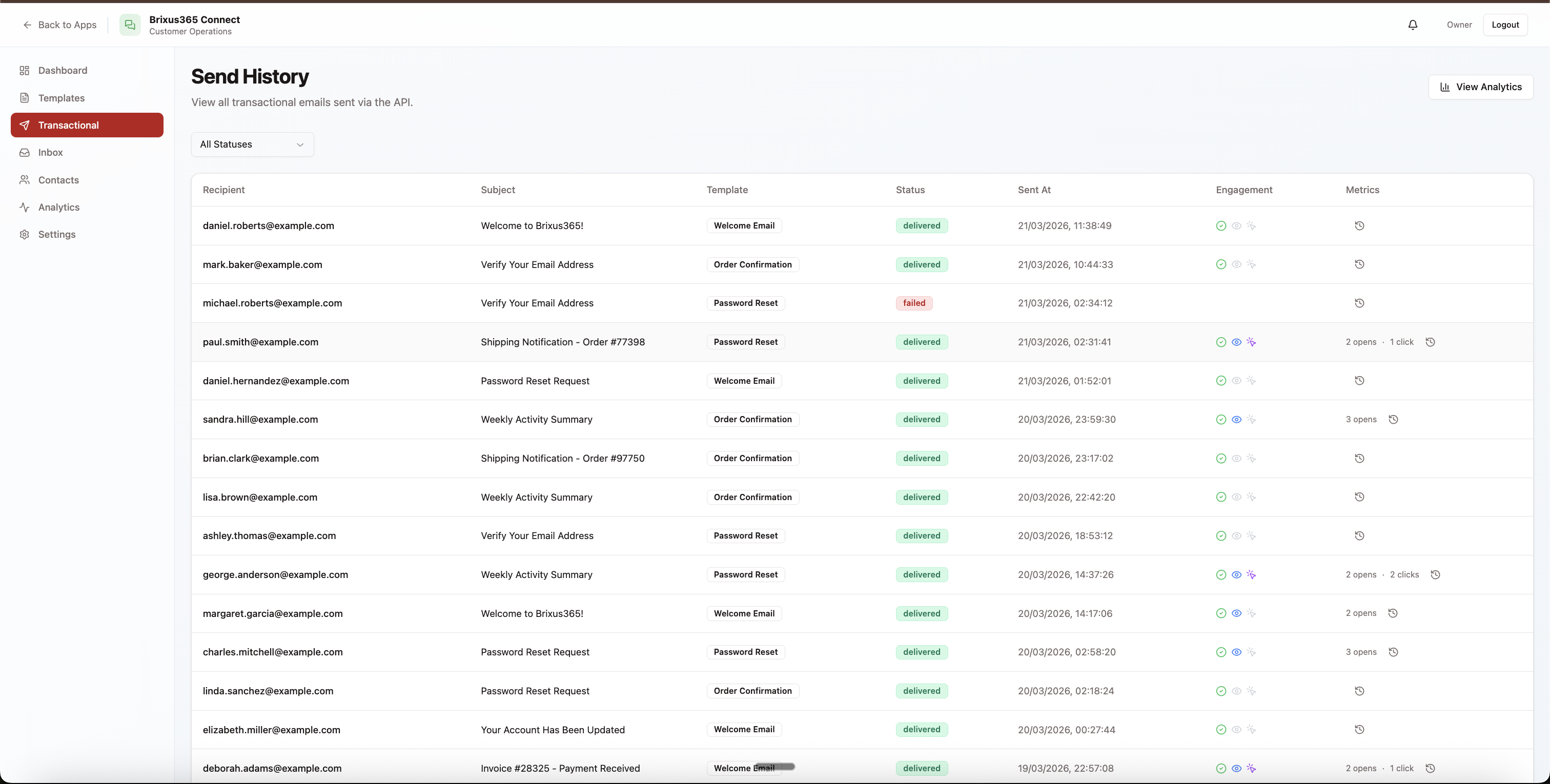
Sending the email is only half the story. Once Brixus365 dispatches your transactional email, a chain of tracking events begins: delivery confirmation, open detection, click tracking, and bounce/complaint monitoring. Every event is logged with a timestamp and available in both the analytics dashboard and via webhooks.
The analytics dashboard shows you aggregate metrics — delivery rate, open rate, bounce rate — as well as per-template breakdowns so you can identify which email types are performing well and which need attention. You can track individual emails by their messageId or analyze trends across thousands of sends.
Frequently Asked Questions
Can I use templates I designed in the visual editor?
How fast are transactional email sends?
What happens if my quota is exceeded?
Can I use both SMTP and the REST API simultaneously?
How do I migrate from SendGrid or Mailgun?
Do transactional emails count toward my marketing email quota?
Can I add tracking to SMTP emails?
Ship transactional email in minutes
REST API + MCP server. Free plan covers 9,000 emails/month — no credit card to start.